A cached response can make a screen useful before a network request finishes. The important distinction is which result is only an earlier display value and which result the application considers authoritative.
This older example used bflutter 0.1.2 and an Observable-based API. It has not been rebuilt against current Flutter or stream-library versions.
Mark the result’s origin
/// Cache data from the Network model
class NetCache<T> {
  final T data;
  final dynamic error;
  bool fromNet = false;

  bool get hasData => data != null;
  bool get hasError => error != null;

  NetCache({bool fromNet, this.data, this.error}) {
    if (fromNet != null) this.fromNet = fromNet;
  }
}
fromNet separates network data from local data. The wrapper also exposes data and error checks, although the surrounding stream still needs a deliberate error policy.
Merge the two sources
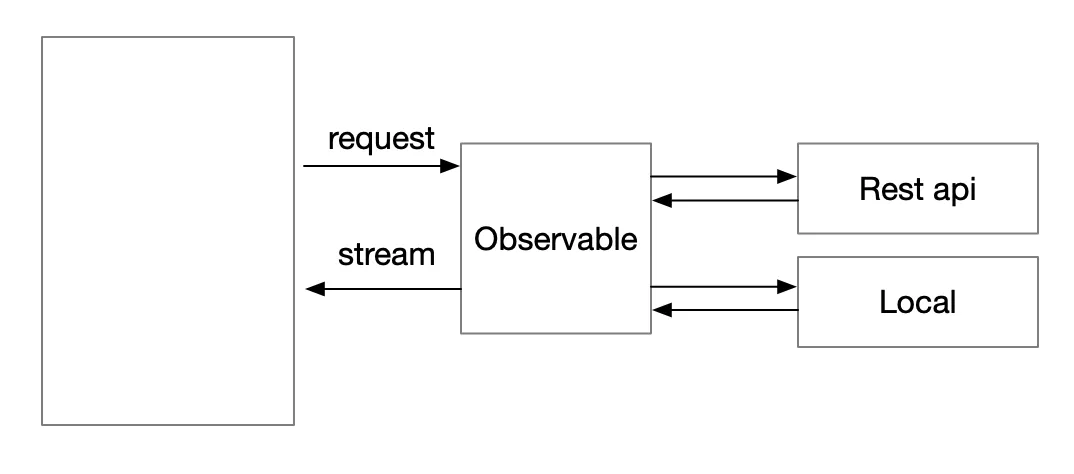 The original cache-flow diagram, recovered from the local upload behind its old WordPress image-proxy URL.
// @nhancv 10/7/2019: Combine with cache data
return Observable<NetCache<List<User>>>.merge([
  // Get data from api
  Observable.fromFuture(Api().searchUsers(input))
      .asyncMap((data) async {
    print('From net: $data');
    if (data == null) {
      return NetCache(fromNet: true, data: <User>[]);
    }
    if (data.statusCode == 200) {
      final List<User> result = json
          .decode(data.body)['items']
          .cast<Map<String, dynamic>>()
          .map<User>((item) => User.fromJson(item))
          .toList();
      // @nhancv 10/7/2019: Storage data from network to local
      await BCache().insert(Piece(id: input, body: data.body));


      // @nhancv 10/7/2019: Return latest data from network
      return NetCache(fromNet: true, data: result);
    } else {
      throw (data.body);
    }
  }).handleError((error) {}),
  // Get data from local storage
  Observable.fromFuture(BCache().queryById(input)).map((data) {
    print('From cache: $data');
    if (data == null) {
      return NetCache(data: <User>[]);
    }
    List<User> result = json
        .decode(data.body)['items']
        .cast<Map<String, dynamic>>()
        .map<User>((item) => User.fromJson(item))
        .toList();
    return NetCache(data: result);
  })
]);
The network path stores successful responses locally, while the cache path reads an earlier response for the same input. A merge emits results as they arrive; it does not by itself guarantee that cached data can never arrive after a network result. The UI must use origin and freshness deliberately if the network result is meant to be final.
The empty network error handler is another limitation of the historical listing. It should not be mistaken for an explicit offline/error state.
Keep persistence separate
The original example lives in the bflutter 0.1.2 search source. Flutter’s SQLite persistence recipe explains the separate storage boundary. No cache reads, writes, or network requests were performed for this revision.