Infrastructure is easier to reason about when the boundaries are visible. This experiment separated a frontend, backend services, and data access into distinct tiers, then placed the deployment across two Availability Zones.
Historical architecture. This is an explanation of an earlier Terraform experiment, not a newly tested deployment guide. Service details, instance choices, and the repository’s configuration need a fresh review before reuse. No AWS resources were created for this revision.
Start with the application
Before adding infrastructure, look at the work the application is doing: redundant requests, overly frequent polling, expensive synchronous operations, error loops, and heavy tasks that could be handled asynchronously. More instances do not make inefficient work disappear.
The original note also emphasized planning for availability and scaling before deployment, then checking load and security behavior before going live. That remains the useful intent of the experiment: the diagram should explain how traffic moves and where failures can be isolated.
The three boundaries
| Tier | Responsibility in the example | Traffic path |
|---|---|---|
| Frontend | Serve the web application | Internet-facing load balancer to frontend instances |
| Backend | Handle private application logic | Internal load balancer to backend instances |
| Data access | Mediate access to the database | Internal service boundary in front of the data stores |
The extra data-access service was a choice in this particular design. A separate database microservice is not a requirement for every three-tier application; its value depends on the boundaries the application actually needs.
Lay out the network
The original example used us-east-1, a VPC with CIDR 10.0.0.0/16, and two Availability Zones. Each zone had a public subnet and private subnet groups for the frontend, backend, and data-access tier.
Public entry points and private application components have different jobs. The diagram includes an internet-facing load balancer for the frontend, internal balancing between tiers, a bastion path for administration, and database placement across zones. NAT and bastion access are distinct roles and should be reviewed separately.
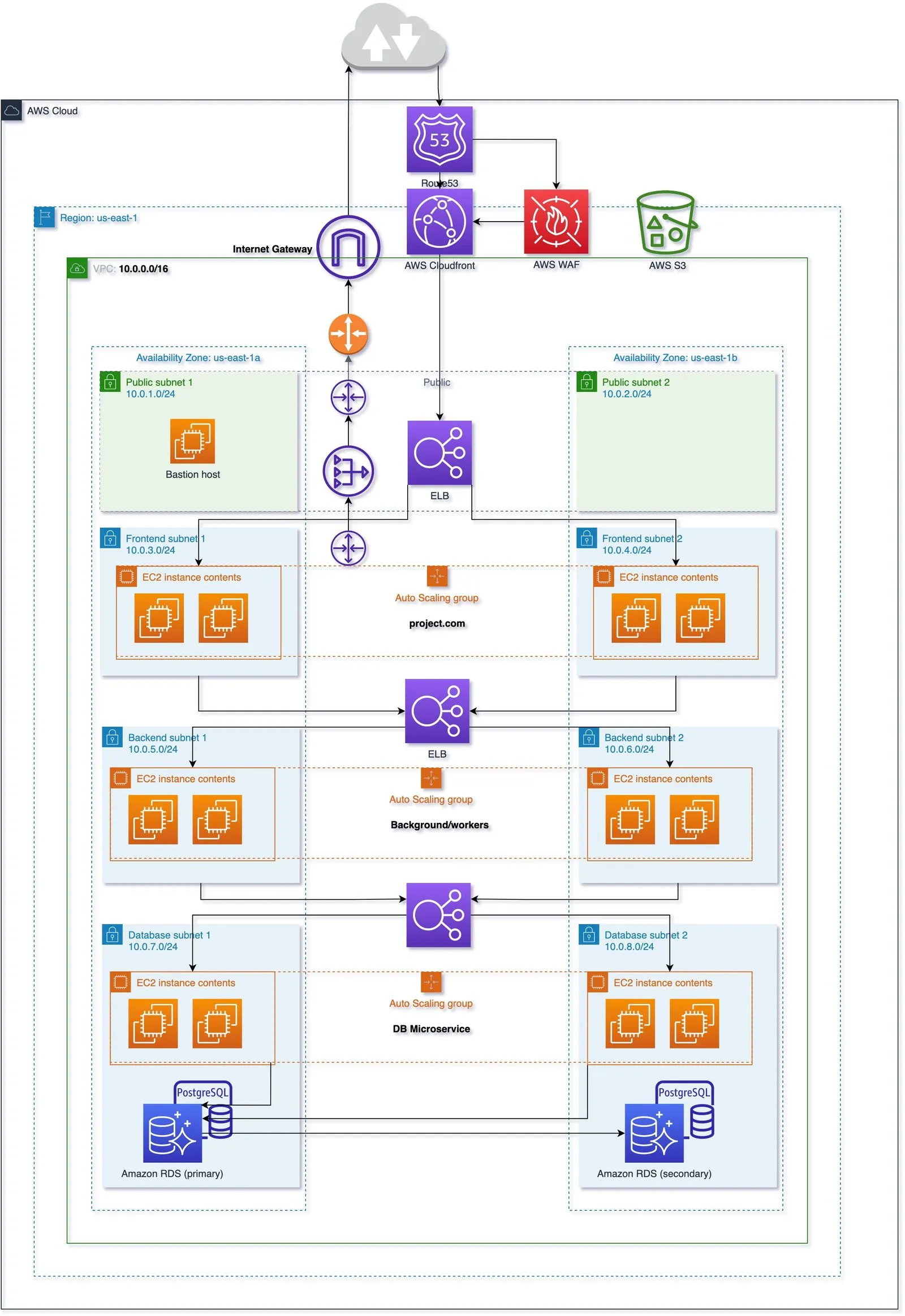 The original two-zone diagram. It records one design, including its additional data-access service, rather than prescribing a universal layout.
Health and scaling
The example grouped instances by tier and used Auto Scaling health checks and scaling policies. Its notes describe both predictive scaling and dynamic scaling using CloudWatch signals.
For current behavior and terminology, use the official EC2 Auto Scaling and Application Load Balancer documentation. A diagram and an Auto Scaling group do not replace testing the application’s actual failure and load behavior.
The Terraform experiment
The public Terraform source is the starting point for the original experiment. The original post showed this application command:
terraform apply -auto-approveThat bypasses Terraform’s interactive approval. It is retained here as a historical command, not as a recommendation to apply an unreviewed plan. Read the repository and inspect the intended changes before applying infrastructure.
The older console screenshots and temporary frontend blob: image URLs are omitted from this revision. The diagram and tier descriptions carry the architectural explanation without suggesting that those old resources are still running.
Clean up and verify
The original cleanup command was:
terraform destroyAfter any real experiment, verify what remains in the account rather than assuming one successful command proves that every billable resource is gone. This revision makes no claim about a live deployment or its costs.